

DOOM: The Gold Standard of Contrived Engineering Challenges
For those who may not be familiar, a very specific engineering sub-culture has formed over the last 30 years concerned with getting Id Software’s 1993 video game “DOOM” running on essentially anything with electricity. Some of the more notable items that can run DOOM are a pregnancy test, rat neurons, and a TI-84 calculator powered by a pile of rotting potatoes. This phenomenon is in part due to a love for the game, as well as the incredibly basic performance requirements to run it. Because the full source code to the game was released in 1997 by its creator John Carmack, anyone can take a crack at modifying it to fit their specific system’s constraints. Being a huge fan of these projects but fresh out of spare potatoes, I turned my gaze to the TK-02 on my desk as a potential next sacrifice to the DOOM gods.
Doom Port Nepotism
Now, I must admit, being the firmware engineer for this machine already gives me a massive leg up on the usual boutique DOOM ports. Generally, the first step in porting DOOM to [Insert Impossibly Ridiculous Platform Here] is actually breaking into said device so that custom firmware can be flashed on it. As my job is flashing firmware to the TK-02, no hacking is required!
The Trenches (Rip and Tear)
For those who just want to see DOOM running on the coffee machine, scroll to the bottom. However, for those not afraid of terms like “memory arenas”, “framebuffers”, and “file systems” this section is for you. I mentioned earlier that the full source code to the game was released for free. That’s a little bit misleading. To be more accurate, the full source code for the game engine was released. .WAD files containing the actual data for a particular DOOM game (for instance the free shareware version) are required and read by the game engine to actually play anything. The term “source port”, refers to a modified version of this original engine code updated to bring new features that weren’t available in the original game’s release (like running in a resolution that isn’t 320x200). At an extremely high level, successfully porting DOOM involves accomplishing the following:
- Selecting your source port of choice (or building your own!)
- Providing a way for the game engine to send frames to your display
- Providing a way to send inputs to the game (move, fire, etc.)
- Providing a file system for saving/loading games
- Providing a way to load .WAD files
- Providing a way for the engine to allocate memory for assets loaded from the .WAD file
- Providing a way to output sound if your hardware supports it
While I’m unfortunately not allowed to divulge the exact processor/components/etc. our system uses, I can give some general information about the specific challenges the TK-02 has in relation to these porting requirements. We are using a “bare metal” ARM Cortex-M based ST Micro 32 bit MCU to control our system, meaning we do NOT have an OS to provide things like a file system, display drivers, etc. We have a variety of RAM and FLASH memory spread out across the processor itself and external ICs that were fully utilized in order to get this thing running.
The Source Port
I ended up using the doomgeneric project as my source port, as it assumes the least about what you have available on your system. The biggest two things this project abstracts away is display, and input, which we’ll cover first.
Display
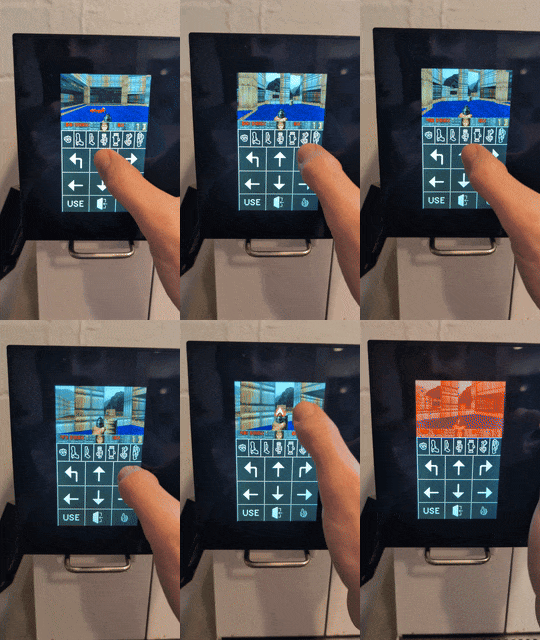
When a frame is ready in doomgeneric, you are presented with that data, and it’s up to you to provide your own implementation that draws said frame to your screen. In my case, this involved copying frame data + doing some interesting aspect ratio adjustment so that it fit properly on the screen where I intended it to. I set aside the top portion of the screen to hold the game screen, so that the bottom portion could be used for touch controls. Which brings us to…
Input
doomgeneric constantly looks for input, however it’s up to you to provide that input. Enter the TK-02’s touchscreen! This was fairly straightforward, different ranges of touch coordinates are mapped to various inputs the game can receive. Since real-estate is limited, only the absolutely necessary inputs are used. To squeeze even a little more room in, I landed on just touching the actual game screen to “fire”.
File System
This was one of the more interesting things to implement. I ended up using LittleFS to create a teeny file system on external flash memory. Saving and loading games is fully supported, albeit slooooooooooooow.
Loading .WAD Files
This was one of the trickiest early roadblocks in the port. The external flash memory I use for Save/Load games is far too slow to support the whopping 4MB (yes that’s large in my world) .WAD file for the free shareware version of DOOM (confusingly referred to as doom1.wad, as that’s the file’s name). With the help of some linker script magic, I ended up just embedding the entire .WAD file as a binary data blob in the firmware itself. Then, after some hacking up of doomgeneric code, the engine now reads in this .WAD file from a fixed memory location on boot. In a port involving an actual OS, you would usually let users pass in a .WAD file of choice on the command line. Given we don’t have an OS or a command line, the .WAD file being used is permanently set for all of time.
Memory Allocation
For fascinating/boring reasons depending on who you are that I won’t get into, DOOM uses a “memory arena” approach to allocating memory for game assets. Generally speaking, nothing strikes more fear into the hearts of firmware engineers than the phrase “dynamic memory allocation”. This was by far the hardest part of the port. Using a fantastic open source library I found Umm Malloc , I was able to create a large enough memory pool for DOOM to use spread out across internal MCU RAM in addition to an external SDRAM IC.
Sound
Sadly, there are no speakers on the TK-02. This is recommended background music while playing to get the full experience.
Welcome to Hell
As you will see below, the port ended up running far better than I ever could have imagined. Some custom control graphics from our creative team really tied the entire experience together, and the game runs without any noticeable lag. And while it takes some getting used to, the touchscreen controls ended up being reasonable to use. That being said, any kind of difficulty setting is all but impossible for anyone but the most experienced DOOM veterans. Some other minor hacks to the engine disable the ability to quit the game (as there’s nothing to go back to), so TK-02: Doom Edition will play DOOM from the time it’s powered on until the heat death of the universe.
Frequently Asked Questions
Why?
Because once I realized it was possible I couldn’t rest until I saw the DOOM slayer on the TK-02. And on a more serious note because it was an extremely challenging and fun process overcoming all the system limitations to get it running.
Will I ever get this on my TK-02?
Sadly… No. This was a silly project I tackled in my free time that pushes our system to its absolute limits. There isn’t any room for the “normal” firmware that brews coffee (the machine’s actual purpose, I keep reminding myself) so the machine can either play DOOM or brew coffee, but not both.
Can you publish the source code for this port?
At this time, sadly no. In the future? Hopefully. If you’re interested in bare metal ports of DOOM in general, however, I would highly recommend checking out some of the following projects: